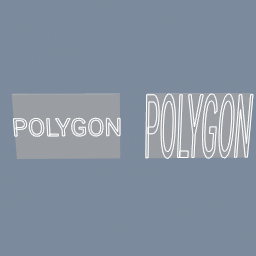
The same logo scaled onto the same plate twice: fitted whole on one branch, stretched to fill on the other, with no size typed anywhere.
geo/TransformAlign geo/Text
Documentation / Node reference / geo nodes
Creates geometry from text, as outlines or as filled faces.
Primitives
Shapes a string with a font and builds geometry from the glyph outlines: segments with 'type' set to LINE, triangles with FLAT. The font is either the one baked into the binary (printable ASCII, nothing to load) or a .ttf you point 'font' at.
Each line of text becomes its OWN object, so a three-line string produces three objects. Break a line by pressing Enter in the text field; the two-character \n is accepted as well, which is what an expression can produce.
Lines are spaced by the font's own line advance, so the gap does not change with the letters on the line, and 'lineHeight' multiplies it. 'align' anchors each line horizontally, 'verticalAlign' anchors the block as a whole.
**The text is always 2D.** Glyph outlines are flat by construction, so it stores two numbers per point instead of three and cannot leave its plane. Put a geo/DimensionPromote after it to get a 3D one, which is what a node that needs to move a point out of the plane wants.
| Name | Type | What it does |
|---|---|---|
| fontSource | UInt8 EMBEDDED · CUSTOM | EMBEDDED uses the font baked into the binary: printable ASCII only, with no file to load. CUSTOM reads 'font', which makes the node asynchronous while the asset arrives. |
| font | AssetPath | The .ttf to shape with, when fontSource is CUSTOM. |
| type | UInt8 LINE · FLAT | LINE builds the glyph outlines as segments. FLAT fills them into triangles. |
| text | String | The text to build. Enter inserts a line break, and the two-character \n is accepted too. Each line becomes its own object; an empty line still takes up its line. |
| align | UInt8 LEFT · MIDDLE · RIGHT | Where each line sits horizontally: its left edge, its centre or its right edge on x=0. |
| verticalAlign | UInt8 BASELINE · TOP · MIDDLE · BOTTOM | Where the block of lines sits vertically: on the first line's baseline, hanging from the top of it, centred, or standing on the bottom of the last line. Measured from the font's ascent and descent, so it does not shift when the letters change. |
| samplesCount | UInt8 | Points used per curve in a glyph outline. Higher is smoother and heavier. |
| maxSegmentSize | Float | Longest a sampled segment may be, in world units. Curves are subdivided until they fit; 0 leaves the subdivision to samplesCount. |
| maxPointsCount | UInt32 | Cap on the points one curve may be sampled into when maxSegmentSize is driving it. 0 is no cap. |
| size | Float | Height of one em, in world units. The same value means the same size in every font. |
| lineHeight | Float | Multiplier on the font's own line advance: 1 is the spacing the font asks for, 2 is double-spaced. |
| letterSpacing | Float | Extra space after each character, as a fraction of 'size': 0.1 opens every gap by a tenth of the text height, a negative value pulls the letters closer. Accents stay on their letters. |
| color | Color | Colour attribute written on the points. LINE only: FLAT does not write one. |
Scenes you can open in the editor that teach this node.
The same logo scaled onto the same plate twice: fitted whole on one branch, stretched to fill on the other, with no size typed anywhere.
geo/TransformAlign geo/Text
This page is generated from the engine, so it describes the release you can download. The same text is in the editor's Help panel next to the node itself.