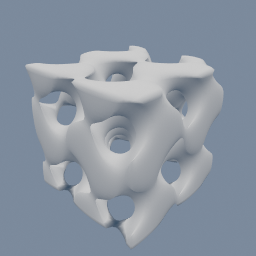
A geo/VolumeBuilder writes a gyroid clipped to a box into a WEIGHT attribute, and geo/VolumeTriangulate meshes it with the inside stated.
geo/VolumeBuilder geo/VolumeTriangulate
Documentation / Node reference / geo nodes
Turns a volume into a triangle mesh, at the surface where its values cross a threshold.
Volume
Reads one number per voxel, from the attribute you pick, and builds the surface where that number equals the threshold. Each volume on the input becomes one mesh, in input order.
**Inside tells the node which side of that surface is solid**, so the triangles face out of it. Pick ABOVE when the values are high inside the shape, and BELOW when they are low inside. The two usual pairs:
- **density, inside ABOVE, threshold 0.5.** A density volume is 1 inside the shape and 0 outside, so halfway is the surface. This is the default.
- **distance, inside BELOW, threshold 0.** A signed distance is negative inside, positive outside and zero on the surface.
Get inside wrong and the shape still appears in the right place, but turned inside out: its normals point in, it shades dark, and a boolean or a 3D print reads it as a hole.
The threshold moves the surface. On a distance volume, a threshold of 0.1 puts it 0.1 outside the original shape and -0.1 puts it 0.1 inside, which is a quick way to grow or shrink a shape. On a density volume, values between 0 and 1 only exist across one voxel at the edge, so the threshold mostly nudges the surface within that voxel.
Any float attribute on the volume works, not only density and distance, so a field written by geo/VolumeBuilder can be meshed directly. A volume without the attribute you picked is an error naming it. A threshold the values never cross gives no mesh for that volume, without an error.
**Weld is on by default**, and it is what makes the mesh usable as a solid: one point wherever triangles meet, a closed mesh even where the shape runs into the edge of the volume, and normals taken from the field so the surface shades smooth instead of showing every voxel. Turn it off only for the faceted look.
A DISTANCE volume shows its surface in the viewport with no node at all, which is the quick way to judge a shape. This node is for when the triangles themselves are needed: to export, to print, or to keep working on as a mesh.
| Name | Type | What it does |
|---|---|---|
| attributeName | AttributeName | Which per-voxel float attribute to mesh. Density for an occupancy volume, distance for a signed distance field, or any float attribute you wrote yourself. |
| inside | UInt8 ABOVE · BELOW | Which side of the threshold is inside the shape, so the triangles face out of it. ABOVE for a density (high inside), BELOW for a signed distance (negative inside). |
| threshold | Float | The value the surface passes through. 0.5 suits a density, which runs from 0 outside to 1 inside. 0 suits a signed distance, and other values grow or shrink the shape by that distance. |
| weld | Bool | Share one point between every triangle that meets there, close the mesh where the shape runs into the edge of the volume, and take the normals from the field so the surface shades smooth. This is what a 3D print, a boolean or an export wants. Off gives every triangle three points of its own and its own flat normal, so each voxel shows as a facet, and leaves a hole wherever the shape touches the edge of the volume. |
Scenes you can open in the editor that teach this node.
A geo/VolumeBuilder writes a gyroid clipped to a box into a WEIGHT attribute, and geo/VolumeTriangulate meshes it with the inside stated.
geo/VolumeBuilder geo/VolumeTriangulate
This page is generated from the engine, so it describes the release you can download. The same text is in the editor's Help panel next to the node itself.