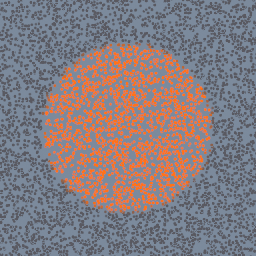
Points coloured inside a geo/PointBuilder by the density of a sphere's volume wired on its second input, read at each point by code/VolumeSample.
code/VolumeSample geo/PointBuilder geo/VolumeCreate
Documentation / Node reference / code nodes
Samples a volume wired into this builder, at any position.
Volume
Wire a volume into one of the builder's inputs and this node reads one of its attributes, density by default, at the position you give it. Left unwired, the position is the one of the point, voxel or object being visited.
The value is blended smoothly between voxel centres, and positions outside the volume read its edge voxels. The input is read as it came in, so on a geo/VolumeBuilder's own input it reads the volume before the builder wrote to it. An input with no volume reads zero.
To read an element at an index rather than a field at a position, use code/Attribute. It works inside geo/PointBuilder, geo/VolumeBuilder and geo/ObjectBuilder.
| Name | Type | What it does |
|---|---|---|
| P | Vector3 | Where to sample, in the visited geometry's own space. Left unwired it samples where the visited point, voxel or object is. |
| inputIndex | UInt8 | Which of the builder's inputs holds the volume, 0 to 3. Its first volume object is sampled. |
| name | AttributeName | The volume attribute to sample. |
| geoType | UInt8 FLOAT · INDEX · U32 · VECTOR2 · VECTOR3 · VECTOR4 · VECTOR2_64 · VECTOR3_64 · FLOAT64 · VECTOR2_U32 · VECTOR3_U32 · VECTOR4_U32 | The attribute's type: a float or a float vector. |
Scenes you can open in the editor that teach this node.
Points coloured inside a geo/PointBuilder by the density of a sphere's volume wired on its second input, read at each point by code/VolumeSample.
code/VolumeSample geo/PointBuilder geo/VolumeCreate
This page is generated from the engine, so it describes the release you can download. The same text is in the editor's Help panel next to the node itself.