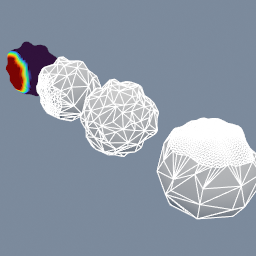
A lumpy ball reduced to 5% of its triangles three ways: evenly, keeping more points where an importance attribute says so, and keeping a locked group of points untouched.
geo/Decimate geo/AttributeTransfer geo/AttributeDisplay geo/GroupCreate
Documentation / Node reference / geo nodes
Reduces the triangle count of a mesh while preserving its appearance.
Topology
Simplifies each input triangle mesh with a quadric error metric (the polyReduce operation), stopping at the requested target or when the error budget is reached, whichever comes first. Topology is preserved: a watertight mesh stays watertight, and a non-manifold mesh (a raw scan) is decimated as-is without ever failing the cook. Typical use is taming dense imports: decimate a multi-million-triangle scan before feeding remeshing or simulation nodes. Other geometry types pass through unchanged.
| Name | Type | What it does |
|---|---|---|
| mode | UInt8 RATIO · TRIANGLE_COUNT | How the target is expressed: as a fraction of the input triangle count, or as an absolute triangle count. |
| ratio | Float | Fraction of the input triangle count to keep (0.25 keeps a quarter of the triangles). |
| count | UInt32 | Triangle count to aim for, clamped to the input count. Useful to bring inputs of very different densities to the same budget. |
| maxError | Float | Maximum simplification error, as a fraction of the mesh extent (0.01 = 1%). The node stops simplifying once reaching the target would exceed this. |
| lockBoundaries | Bool | Keep open-boundary vertices in place (rims, cut edges), so a decimated piece still lines up with neighbouring geometry. |
| pruneSmallComponents | Bool | Remove disconnected components smaller than the error budget: scan dust and floaters. |
| weld | Bool | Merge coincident vertices first, so seamed or triangle-soup inputs (STL scans) decimate as one connected surface. An input that is already a closed manifold is left alone: welding it could only pinch it, which would cost triangles and open holes. |
| repair | Bool | Repair the simplifier's output: cancel the zero-volume face pairs it leaves, split the edges that still carry more than two faces, and only as a last resort drop a face. Turn it off to see exactly what the simplifier produced, or when a downstream node does its own repair. Editable-mesh consumers (geo/Remesh, geo/QuadRemesh) need it on. |
| lockGroup | String | A point group whose points stay exactly where they are and are never removed, such as the points on a feature line or the outline. Leave it empty to lock nothing. |
| importance | AttributeName | A point attribute saying which points matter, for example one built from geo/Silhouette and geo/RidgeValley. Points at or above the threshold are kept in preference to the others. Without the attribute, nothing is steered. |
| importanceThreshold | Float | Points whose importance is at least this are kept in preference. The simplifier treats importance as on or off, not as a gradient, so this is where the line is drawn. |
| allocator | UInt8 TEMP · POOL · FLAT_POOL | Which allocator backs the scratch buffers. All three are given back when the cook ends: a pool (the default) grows as it needs to, a flat pool has a fixed reserve, and temp shares the frame's scratch with every other cook. |
Scenes you can open in the editor that teach this node.
A lumpy ball reduced to 5% of its triangles three ways: evenly, keeping more points where an importance attribute says so, and keeping a locked group of points untouched.
geo/Decimate geo/AttributeTransfer geo/AttributeDisplay geo/GroupCreate
This page is generated from the engine, so it describes the release you can download. The same text is in the editor's Help panel next to the node itself.