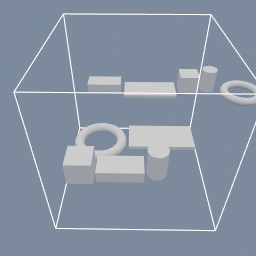
Five parts of different sizes laid out twice: as a row, and packed onto a 256 mm plate that is then measured against the build volume.
geo/TransformLayout geo/BoundsCheck
Documentation / Node reference / geo nodes
Arranges the input's objects side by side: a row, a grid, or a packed plate.
Transform
Every object is measured on its own, given a CELL, and moved so a named point of its box lands on the same named point of that cell. The measure is the WORLD bounding box of the object AND everything parented under it, so an assembly takes a cell big enough for the whole of it and its pieces ride along with its root.
ROW puts one cell per object side by side, each as wide as its object. Past wrapLength a new row starts, as deep as the deepest object of the row it left.
GRID gives every object the same cell, columns of them per row. A cellSize of zero on an axis means "as big as the largest object on that axis".
PACK is the shelf packing a print plate wants: biggest first, rows filled across the plate, and a verdict on anything that did not fit.
The arrangement starts at the world ORIGIN and grows along the two positive axes of plane. It writes the stage attribute LAYOUT_SIZE, the world box of the result, which a geo/BoundsCheck downstream measures against a build volume and an expression reads with attrib(.LAYOUT_SIZE, entityType=.STAGE).
Only the stage roots are laid out by default, so a hierarchy moves as one piece. In GEOMETRY mode the move is baked into the points of the selected objects alone, and a child parented under one does NOT follow.
| Name | Type | What it does |
|---|---|---|
| group | String | Which objects to lay out. Empty lays out the stage ROOTS, so a parented assembly is placed once at the top and its pieces ride along. |
| mode | UInt8 ROW · GRID · PACK | How the cells are built. ROW is one cell per object, side by side. GRID is one size of cell for all of them, in columns. PACK fills a plate of a given size, biggest first. |
| transformMode | UInt8 OBJECT · GEOMETRY | OBJECT writes the move onto the object's transform, which is reversible and carries its children with it. GEOMETRY bakes it into the point positions, and a child parented under a moved object does not follow. |
| margin | Float | The gap kept between two neighbouring boxes, and between two rows. It is not an edge margin: the first cell still starts at the origin. |
| cellAnchorX | UInt8 NONE · MIN · CENTER · MAX | Where the object sits inside its cell, on X. NONE leaves X alone, so the object keeps the coordinate it arrived with. |
| cellAnchorY | UInt8 NONE · MIN · CENTER · MAX | Where the object sits inside its cell, on Y. MIN stands it on the cell's floor, which is the default in the XZ plane: parts rest on the ground however tall they are. |
| cellAnchorZ | UInt8 NONE · MIN · CENTER · MAX | Where the object sits inside its cell, on Z. NONE leaves Z alone. |
| order | UInt8 INPUT · NAME · SIZE_DESCENDING | Which order the objects are placed in. INPUT is the order they arrive in. NAME is by object name, ascending. SIZE_DESCENDING puts the biggest footprint first, which is what makes a packed plate tight. PACK sorts by size on top of this, so this decides only what happens between objects of the same size. |
| plane | UInt8 XZ · XY · YZ | Which plane the arrangement lives in. The first named axis is what a row runs along, the second is what rows advance along, and the third is left out of it: that is the axis the parts stand on. XZ is the floor of a Y-up scene. |
| wrapLength | Float | ROW: the length a row is allowed to reach before the next object starts a new one. Zero never wraps, so a row runs as long as it needs to. |
| columns | UInt32 | GRID: how many cells there are per row. The rows advance along the plane's second axis. |
| cellSize | Vector3 | GRID: how big every cell is. Zero on an axis means the largest object on that axis, so nothing is ever clipped by a cell that is too small for it. |
| plateSize | Vector2 | PACK: the plate to fill, on the plane's two axes. For print preparation this is the printer's bed. |
| errorOnOverflow | Bool | PACK: put the node in error when an object does not fit on the plate, naming the first one, which stops the graph before an exporter downstream writes a plate nobody can print. Turn it off and the leftovers are placed in rows PAST the plate, with LAYOUT_OVERFLOW_COUNT saying how many, which is what a configurator reads. |
Scenes you can open in the editor that teach this node.
Five parts of different sizes laid out twice: as a row, and packed onto a 256 mm plate that is then measured against the build volume.
geo/TransformLayout geo/BoundsCheck
This page is generated from the engine, so it describes the release you can download. The same text is in the editor's Help panel next to the node itself.