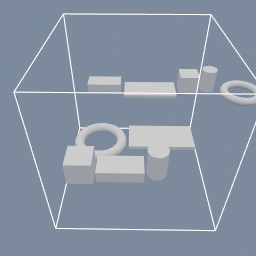
Five parts of different sizes laid out twice: as a row, and packed onto a 256 mm plate that is then measured against the build volume.
geo/TransformLayout geo/BoundsCheck
Documentation / Node reference / geo nodes
Measures the input against a target box and reports whether it fits. It moves nothing and resizes nothing.
Transform
The size measured is the WORLD bounding box, composed through the hierarchy, so a parented assembly is measured as the assembly rather than as its pieces.
Nothing is transformed. The verdict is written onto the output stage instead, as the attributes FITS_BUILD_VOLUME (1 when it fits, 0 when it does not) and BUILD_VOLUME_OVERFLOW (how far past the target the input reaches on each axis, zero on an axis that fits). An expression can read either with attrib(.NAME, entityType=.STAGE).
With errorOnOverflow on, a model that does not fit puts the node in error and the graph stops, so an exporter downstream never writes a file nobody can print. Turn it off and the same numbers are published while the graph carries on, which is what a configurator reads.
To RESIZE the input to fit instead of reporting on it, use geo/TransformAlign in SCALE mode.
| Name | Type | What it does |
|---|---|---|
| group | String | Which objects to measure. Empty measures the stage ROOTS, so a parented assembly is measured once at the top rather than once per piece. |
| batchMode | UInt8 ALL_OBJECTS_TOGETHER · OBJECTS_INDIVIDUALLY | ALL_OBJECTS_TOGETHER measures the whole assembly as one box, which is the question an exporter asks. OBJECTS_INDIVIDUALLY measures each object on its own and reports the WORST case over them, per axis. |
| size | Vector3 | The target box, as a size on each axis. For print preparation this is the printer's build volume. |
| margin | Float | Clearance to keep, subtracted from the target on every axis before anything is measured against it. A margin of 10 against a 256 target measures against 246. |
| errorOnOverflow | Bool | Put the node in error when the input does not fit, which stops the graph before an exporter downstream writes a file nobody can print. Turn it off to read FITS_BUILD_VOLUME and BUILD_VOLUME_OVERFLOW instead and decide in the graph, which is what a configurator wants. |
Scenes you can open in the editor that teach this node.
Five parts of different sizes laid out twice: as a row, and packed onto a 256 mm plate that is then measured against the build volume.
geo/TransformLayout geo/BoundsCheck
This page is generated from the engine, so it describes the release you can download. The same text is in the editor's Help panel next to the node itself.