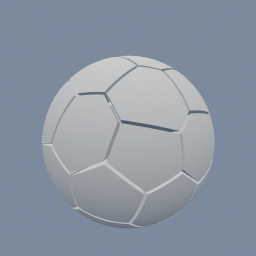
A sphere cut into Voronoi cells around evenly spread points, with a small gap so every piece stands apart.
geo/VoronoiCells geo/PointRelax geo/Scatter
Documentation / Node reference / geo nodes
Spreads the points of input 0 evenly over the surface or volume plugged into input 1.
Copy
Each iteration moves every point to the centre of the area closest to it, so crowded points push apart and gaps fill in. After a few iterations the points sit at even distances, which gives Voronoi cells of nearly equal size.
Input 1 is the domain. A triangle mesh keeps the points on its surface. A volume, for example from geo/VolumeCreate, keeps them inside the voxels whose attribute passes the threshold. Points that start off the domain are pulled onto it by the first iteration.
The result is random only through the samples each iteration draws, so the same seed gives the same points. More iterations and more samples per point give a more even result and take longer.
| Name | Type | What it does |
|---|---|---|
| iterations | UInt32 | How many times every point moves to the centre of its area. 0 leaves the points where they are. 10 is usually even enough; 20 or more for a very regular look. |
| samplesPerPoint | UInt32 | How many random samples each point receives per iteration to estimate the centre of its area. More is smoother and slower; below 10 the points jitter. |
| seed | UInt32 | Changes the random samples. A different seed gives a slightly different, equally even result. |
| volumeAttribute | AttributeName | Volume domain only: the voxel attribute that says where the inside is. |
| threshold | Float | Volume domain only: voxels whose attribute is at least this value are inside. 0.5 suits a geo/VolumeCreate in DENSITY mode, which writes 1 inside and 0 outside. |
Scenes you can open in the editor that teach this node.
A sphere cut into Voronoi cells around evenly spread points, with a small gap so every piece stands apart.
geo/VoronoiCells geo/PointRelax geo/Scatter
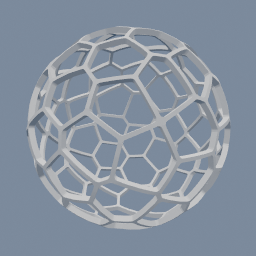
A thin spherical shell with a Voronoi pattern of holes cut through it, the wire look of a lamp shade.
geo/VoronoiCells geo/PointRelax
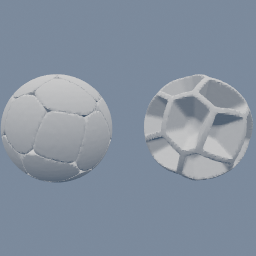
A sphere broken into the Voronoi cells of evenly spread points. On the left, every cell is a pebble with rounded cut edges. On the right, only the walls between the cells are kept, a foam skeleton of the sphere. Change `smoothness` to go from sharp shards to round pebbles.
geo/VoronoiField geo/PointRelax
This page is generated from the engine, so it describes the release you can download. The same text is in the editor's Help panel next to the node itself.