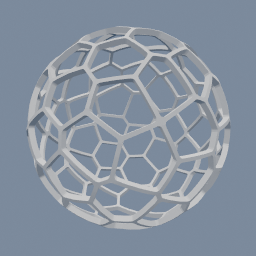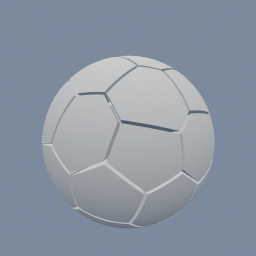
A sphere cut into Voronoi cells around evenly spread points, with a small gap so every piece stands apart.
geo/VoronoiCells geo/PointRelax geo/Scatter
Documentation / Node reference / geo nodes
Breaks the mesh on input 0 into Voronoi cells around the points of input 1: as pieces, as the walls between them, or as a lattice of struts.
Topology
Each point gets the part of the mesh that is closer to it than to any other point: its cell. The walls between cells are flat and sit halfway between neighbouring points.
Input 0 must be a closed mesh: the cells are cut out of its volume. Input 1 is the points, for example from geo/Scatter in a volume. Evenly spaced points give cells of similar size: set geo/Scatter's distribution to POISSON_DISK, or relax the points with geo/PointRelax.
PIECES breaks the mesh into one object per cell, the classic shattered look. Each piece carries a cellId attribute, the index of its point, and its cut faces are in the group 'cut', which is how an inside material is assigned to them. A point whose cell misses the mesh gives no piece.
WALLS keeps the walls between the cells instead, as one object: a honeycomb, or a foam with roundness. STRUTS keeps a tube along every edge of the cells, as one object: a lattice.
The pieces share their points between faces, so the normals are smoothed across the sharp edges. Add a geo/Facet after this node for flat walls that shade flat.
| Name | Type | What it does |
|---|---|---|
| mode | UInt8 PIECES · WALLS · STRUTS | PIECES: one object per cell. WALLS: the walls between the cells, as one object. STRUTS: a tube along every edge of the cells, as one object. |
| gap | Float | Space between neighbouring pieces. 0 leaves them touching. Each wall moves back by half the gap, so small pieces can shrink away entirely when the gap is large. |
| wallThickness | Float | WALLS only: how thick the walls between the cells are. Each cell is shrunk by half of it before it is carved out of the mesh. |
| roundness | Float | Rounds the edges and corners of every cell, as if rolled with a ball of this radius. The flat walls stay where they are; the outside of the mesh stays sharp. 0 keeps the cells sharp. In WALLS mode it rounds the holes, which gives a foam. |
| roundingSegments | UInt32 | How smooth the rounded edges are. More segments give rounder edges and more triangles, and take longer. |
| strutRadius | Float | STRUTS only: the radius of the tube along each cell edge. Where tubes meet, their round ends make a round joint. |
| strutSegments | UInt32 | STRUTS only: how round the tubes are. More segments give rounder tubes and more triangles, and take longer. |
Scenes you can open in the editor that teach this node.
A sphere cut into Voronoi cells around evenly spread points, with a small gap so every piece stands apart.
geo/VoronoiCells geo/PointRelax geo/Scatter
A thin spherical shell with a Voronoi pattern of holes cut through it, the wire look of a lamp shade.
geo/VoronoiCells geo/PointRelax
This page is generated from the engine, so it describes the release you can download. The same text is in the editor's Help panel next to the node itself.