geo/SDFBend
Documentation / Node reference / geo nodes
geo/SDFBend
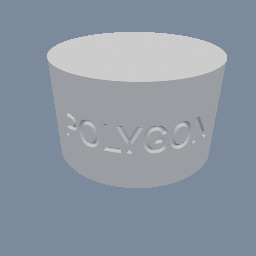
Wraps an SDF object onto a cylinder, over the whole shape or over one band of it.
Sdf Operations
Curves each input SDF object as if the space it lives in were rolled up. The shape runs along `axis`, the arc turns about the next world axis, and the material curves toward the one after that, in X to Y to Z order: so a shape running along X curves toward Z, one running along Y curves toward X, and one running along Z curves toward Y.
`rate` is a CURVATURE, one over the radius, so that zero is straight and the sign says which way it curves. At rate 1 the shape wraps onto a unit radius. The plane through `center` lands EXACTLY on that radius and keeps its length along the arc, which is what makes flat text come out the right size when it is wrapped: this is a true bend, not the cheap shear that goes by the same name. The cylinder's axis lands one radius from `center` on the side the shape curves toward, since bending a flat shape always puts the axis off the shape.
Left unlimited it wraps the WHOLE space: a shape longer than one full turn laps itself, and there is a seam on the far side where the two ends of the lap meet. That is what wrapping a label right around a bottle wants. Turn `limited` on and only the band between `limitMin` and `limitMax`, measured along the straight shape, is bent: outside it the space continues straight, tangent to the arc, so a long bar gets one curve and two straight ends rather than being rolled into a spiral.
The distance is exact along the bent plane and a slight over-estimate on the INSIDE of the arc, where the map squeezes the material. The renderer handles it the way it handles geo/SDFTwist: the object's march step is scaled down by exactly how much this bend can stretch a gradient, worked out from the rate and from how far the input reaches toward the inside. A thin sheet costs nothing worth measuring; a shape thick enough to reach its own centre of curvature is folding through itself and costs march steps.
It takes a 3D field. A 2D one has no direction to curve out of, so it is an error rather than a no-op: extrude the 2D field first. Non-SDF objects pass through unchanged.
Parameters
| Name | Type | What it does |
|---|---|---|
| axis | UInt8 X · Y · Z | Which world axis the shape runs along. It curves toward the axis two steps on in X to Y to Z order, so X curves toward Z, Y toward X and Z toward Y. For any other direction, wrap this node in a geo/Transform in GEOMETRY mode. |
| center | Vector3 | The point of the straight shape that stays put. The cylinder's axis lands one radius from it, on the side the shape curves toward. |
| rate | Float | Curvature: one over the radius the shape wraps onto, so 0.5 wraps onto a radius of 2. The sign is which way it curves. |
| limited | Bool | Bend only the band between limitMin and limitMax and leave the space straight outside it, instead of wrapping the whole of it. |
| limitMin | Float | Where the bend starts, measured along the straight shape from `center`. Read only when limited is on. |
| limitMax | Float | Where the bend ends, measured along the straight shape from `center`. Read only when limited is on. |
Examples
Scenes you can open in the editor that teach this node.
See also
This page is generated from the engine, so it describes the release you can download. The same text is in the editor's Help panel next to the node itself.