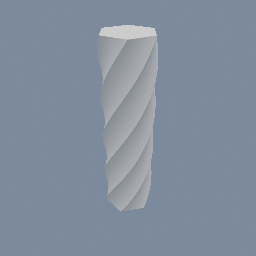
geo/SDFTwist
Documentation / Node reference / geo nodes
geo/SDFTwist
Spirals an SDF object about an axis, tighter the further along it you go.
Sdf Operations
Turns each input SDF object about `axis` by `rate` radians for every unit along that axis, so a straight extrusion comes out as a spiral and a box comes out as a twisted column. It wraps the whole upstream field, so a composed tree twists as one shape rather than piece by piece.
The exact map: a sample at distance d along the axis from `center` is turned about the axis by rate * d before the input reads it, which makes the shape itself appear turned the other way by the same angle. So `center` is both the plane where the twist is zero and the line it turns about, and a positive rate spirals right-handedly about the positive axis.
This is the family's first operation that is NOT distance-preserving. A turn on its own moves a shape without stretching it, but a turn that varies along the axis shears the space, so the field reports a bound rather than a true distance. The renderer handles it: the object's march step is scaled down by exactly how much this twist can stretch a gradient, which is worked out from the rate and from how wide the input is. A narrow shape given a gentle twist costs nothing, and a wide plate given a hard one costs march steps rather than correctness.
Bounds become the input's box swept about the axis, so the cross-section is the circle that fits around it.
It takes a 3D field. A 2D one has no axis to twist about, so it is an error rather than a no-op: extrude or revolve the 2D field first. Non-SDF objects pass through unchanged.
Parameters
| Name | Type | What it does |
|---|---|---|
| axis | UInt8 X · Y · Z | Which world axis the shape spirals about. For a tilted axis, wrap this node in a geo/Transform in GEOMETRY mode. |
| center | Vector3 | The point the axis passes through: both the line the shape turns about and the plane where the twist is zero. |
| rate | Float | Radians of turn per unit along the axis. The sign is the handedness, so a negative rate spirals the other way. |
Examples
Scenes you can open in the editor that teach this node.
See also
This page is generated from the engine, so it describes the release you can download. The same text is in the editor's Help panel next to the node itself.