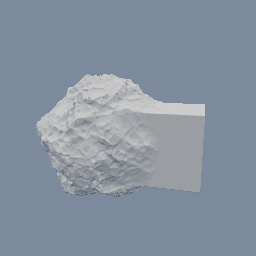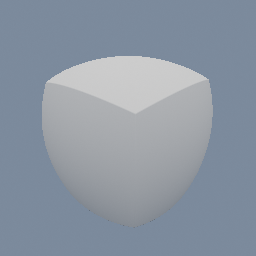
A box and a sphere wired into one geo/SDFBuilder, read by two code/SDFSample nodes and blended by a single factor.
code/SDFSample geo/SDFBuilder
Documentation / Node reference / geo nodes
Builds a signed-distance field from the code nodes inside it, from scratch or from an input field.
Sdf Operations
Dive inside and build the field with code/SDF* primitives and operators, wired into code/Output's distance input. The output object carries the field as SDF geometry: wire it to the geo/Output node to see it raymarched, or compose it with other SDF objects. With nothing on the inputs the bounds params declare where the surface lives, so keep them generous enough to contain it.
Wire an SDF object into the first input and the node MODIFIES that field instead. code/SDFSample inside the sub-network reads it, at whatever position you hand it, which is what tells the three common shapes apart:
displace, `SDFSample(P) + amplitude * Noise(P)`, pushes the surface in and out;
domain warp, `SDFSample(P + amplitude * Noise(P))`, bends the shape itself;
blend, `SDFBoolean(SDFSample(P), SDFSphere(P))` on a smooth union, melts a primitive into it.
The other three inputs are fields to read, not to modify. Each object on the first input is modified on its own, while an input after it is read whole: several SDF objects on it read as their union. Read two inputs at the same position and mix the distances to morph one shape into another.
The bounds then come from the wired inputs, grown by the margin.
| Name | Type | What it does |
|---|---|---|
| size | Vector3 | Local-space size of the box the field's surface fits inside. Read only when nothing is wired into any input, and greyed out once something is. |
| center | Vector3 | Local-space center of the bounds box. Read only when nothing is wired into any input, and greyed out once something is. |
| boundsMargin | Float | How far the modified field may leave the bounds of the wired inputs, on every side. Raise it when a displace pushes the surface past the box and the peaks come out flat. Read only when a field is wired into an input, and greyed out otherwise. |
Scenes you can open in the editor that teach this node.
A box and a sphere wired into one geo/SDFBuilder, read by two code/SDFSample nodes and blended by a single factor.
code/SDFSample geo/SDFBuilder
A sphere wired INTO a geo/SDFBuilder and roughened into a rock, by adding noise to the field code/SDFSample reads back.
code/SDFSample geo/SDFBuilder
This page is generated from the engine, so it describes the release you can download. The same text is in the editor's Help panel next to the node itself.