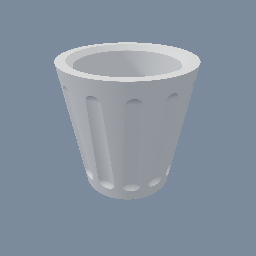
Create a basic vase for 3D printing with SDF
geo/Circle geo/CopyToPoints geo/SDFBoolean geo/SDFTriangulate geo/SDFTube
Documentation / Node reference / geo nodes
Combines SDF objects: union, subtraction or intersection, with a hard, rounded or chamfered seam.
Sdf Operations
Combines every SDF object it is given with the chosen operation, and it takes any number of them: a geo/Copy or geo/Merge fan-in on one input is folded here rather than needing a chain of nodes. Subtraction removes input1 from input0, like geo/M3DBoolean.
This node always joins its second input in WHOLE. To have it act on the first by a controlled amount instead, pressing a pad or a recess into its surface, reach for geo/SDFImprint.
**Which joint is used where.** When only one input carries SDF objects, they are folded with this node's own operation and joint, in input order: three boxes give `((a u b) u c)` under union, `((a - b) - c)` under subtraction, `((a n b) n c)` under intersection. When BOTH inputs carry objects, each input's own objects are unioned first and the operation is applied across the two. That inner union uses this node's profile and size as well, so every joint the node makes looks the same: a hard seam next to a rounded one would read as a bug. A single object on an input passes through untouched.
**The seam.** `profile` chooses its shape and `size` its extent. HARD leaves a sharp crease. ROUND fillets it with an exact circular arc, tangent to both faces, so a right-angle crease comes out as an arc of radius `size`. CHAMFER cuts it with a straight 45 degree face instead. `size` is measured as a setback: how far back from the crease the seam starts, along each face. It means the same thing for all three, so switching profile on a dialled-in value keeps the seam the same size and changes only its shape. Changing operation or profile regenerates the preview shader, while dragging size does not. Non-SDF objects are skipped.
One caveat belongs to CHAMFER alone. The cut is exact where the two faces meet at a right angle and reports up to 41% too much distance as the crease flattens, so the preview march shortens its step for the whole object once a chamfer is anywhere in the tree. That costs steps, and a scene of chamfers may want a higher `maxStepsCount` on its mat/MeshSDF. ROUND has no such cost. geo/SDFTriangulate only samples, so it is exact for every profile.
**Per-region colours.** Put a geo/MaterialAttributes on an input, leave its mode on OBJECT, and that input keeps its colour, roughness, metallic and emission through the boolean: a rounded joint fades one region's colour into the other's across the same width it blends the shape over, and a hard one picks the nearer. Under a subtraction the CUT wall takes the subtractor's colour, so colouring the tool colours the cut. A geo/MaterialAttributes placed AFTER this node sets the DEFAULT instead: every part that was not coloured itself takes it, which is how plain per-object colour and per-region colour are one mechanism rather than two. Nothing is paid until something is authored, and the values themselves are per-object uniforms, so dragging a colour never regenerates the shader. Colouring a SECOND region does regenerate it once, since one record and several are different shaders. The other value edit that costs a rebuild is TRANSMISSION: the first region to let light through (a TRANSMISSION attribute above 0) regenerates the shader once to compile the refraction code in, and the last one going back to 0 regenerates it once to take it out. Those two crossings are the only places a value edit costs a rebuild. geo/SDFTriangulate carries the same values onto the meshed points, which is what makes multi-colour export work.
**Clear and opaque regions in one object.** Union a transmissive input with an opaque one inside it (a clear skin over an opaque skull) and the opaque one shows through the clear one, refracted and tinted by the medium in front of it. Which regions count as opaque follows each region's own TRANSMISSION value, so making a second region clear, or a clear one opaque, is an upload like any other value drag. Two consequences of how the opaque part is found, both worth knowing before building on them. A smooth ROUND or CHAMFER joint between a clear and an opaque region blends the transmission like every other value, so the seam is partly see-through. And a clear input counts as EMPTY when the opaque part is looked for: SUBTRACTING a clear input cuts nothing out of an opaque one seen through the glass, and INTERSECTING with a clear input leaves no opaque part at all, so an opaque region only shows through the glass when it reaches the result through unions and through subtractions of opaque inputs.
The attributes themselves are `COLOR`, `ROUGHNESS`, `METALLIC` and `EMISSION`, so a geo/AttributeCreate writing those names by hand does the same thing: `COLOR` and `EMISSION` are read whether their object type is vector3 or color, and `ROUGHNESS` and `METALLIC` are single numbers, so those two need the object type set to float.
**The result's INTERIOR distance is only a lower bound.** Outside the shape the value is the true distance; inside, it is the distance to the nearest input's boundary, which may be boundary that sits inside another input and is not on the result at all. That shows up as distance bands following the union's hidden seams rather than its outline, and it matters to anything that reads negative values as distances (a negative isoValue, the field ambient occlusion, an extrusion of a 2D union). For a 2D field there is an exact cure: contour this node with geo/SDFTriangulate (dual contouring for corners) and feed the manifold to geo/SDFCreate, which is the exact signed distance to the result's own outline. A 3D field has no equivalent yet.
| Name | Type | What it does |
|---|---|---|
| operation | UInt8 UNION · SUBTRACTION · INTERSECTION | Union, subtraction (input0 minus input1) or intersection. With objects on one input only it is applied between them all, in input order. |
| profile | UInt8 HARD · ROUND · CHAMFER | The shape of the seam. HARD leaves a sharp crease, ROUND fillets it with an exact arc tangent to both faces, CHAMFER cuts it with a straight 45 degree face. |
| size | Float | How far back from the crease the seam starts, measured along each face. Under ROUND that is the fillet radius at a right-angle crease. Shared by every joint this node makes. |
Scenes you can open in the editor that teach this node.
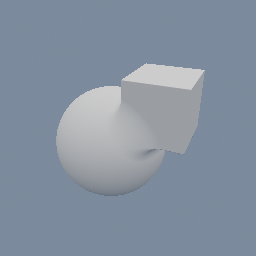
Create a basic vase for 3D printing with SDF
geo/Circle geo/CopyToPoints geo/SDFBoolean geo/SDFTriangulate geo/SDFTube
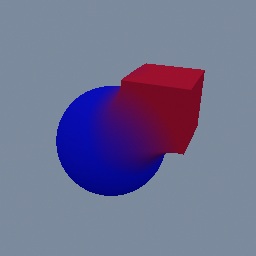
This shows how to apply different colors on an SDF object
geo/MaterialAttributes geo/SDFBoolean geo/SDFBox geo/SDFSphere
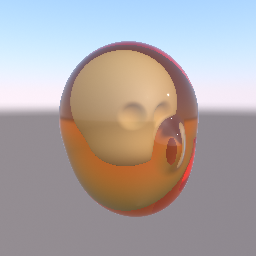
A head printed in clear amber resin, with an opaque skull inside it. The skin and the skull are two regions of one SDF object, joined by a hard union. geo/MaterialAttributes makes the skin transmissive, with an IOR and an amber attenuation colour, and gives the skull a bone colour. The view ray bends into the resin, turns deeper amber the further it travels, and stops on the skull. The light that reaches the skull is not dimmed by the resin around it, and the resin shows the environment, not other objects behind it.
geo/MaterialAttributes geo/SDFBoolean geo/Environment
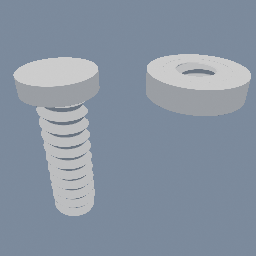
A threaded rod and the nut it turns in, built as fields instead of a more classic sweep geometry.
geo/PolyNode geo/SDFRevolve geo/SDFBoolean
This page is generated from the engine, so it describes the release you can download. The same text is in the editor's Help panel next to the node itself.