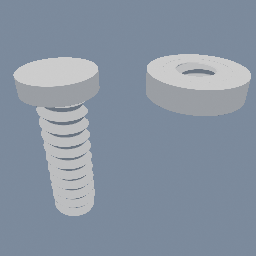
A threaded rod and the nut it turns in, built as fields instead of a more classic sweep geometry.
geo/PolyNode geo/SDFRevolve geo/SDFBoolean
Documentation / Node reference / geo nodes
Revolves a 2D SDF profile about the Y axis into a 3D field, as a ring or as a thread.
Sdf Operations
Spins each input 2D SDF object around the Y axis, pushed `offset` out from it: a circle becomes a torus, a rectangle a ring. The profile lives in the XY plane, so its X points away from the axis and its Y stays world Y, the same axis geo/M2DRevolve uses. The distance is exact while the profile stays on the positive side of the axis; a profile crossing it self-intersects and the field is only a bound there. Only 2D SDF inputs are accepted; non-SDF objects pass through unchanged.
Turn `helical` on and the same profile is screwed rather than spun: it climbs `pitch` for every turn it makes, so a triangle becomes a V thread and a rectangle a square one. A negative pitch cuts a left-hand thread. The thread then runs the whole length of the axis, which is why `boundsHeight` says how much of it to show; cut it to length with geo/SDFBoolean against a geo/SDFTube, or reach for geo/SDFThread, which is that whole assembly in one node. Screwing a profile stretches distance where spinning it does not, so a helical field returns a bound and the march is stepped down to suit it. On a thread whose pitch is small against its radius that costs nothing measurable.
| Name | Type | What it does |
|---|---|---|
| offset | Float | Distance the profile is pushed out from the Y axis before revolving, along plane X. |
| helical | Bool | Screw the profile instead of spinning it: it climbs by `pitch` every turn, which turns a ring into a thread. |
| pitch | Float | How far the profile climbs in one turn, read only when helical is on. The sign is the handedness: positive is a right-hand thread, negative a left-hand one. |
| boundsHeight | Float | Axial extent of the display box, centred on the origin, read only when helical is on. A thread repeats along the axis forever, so this is what says how much of it to draw. |
Scenes you can open in the editor that teach this node.
A threaded rod and the nut it turns in, built as fields instead of a more classic sweep geometry.
geo/PolyNode geo/SDFRevolve geo/SDFBoolean
This page is generated from the engine, so it describes the release you can download. The same text is in the editor's Help panel next to the node itself.