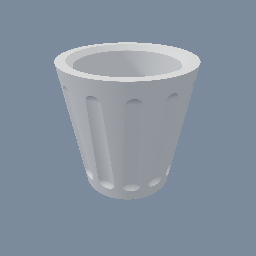
Create a basic vase for 3D printing with SDF
geo/Circle geo/CopyToPoints geo/SDFBoolean geo/SDFTriangulate geo/SDFTube
Documentation / Node reference / geo nodes
Creates a 2D circle, as points, as a line loop or as a filled disc.
Primitives
Creates a circle, with the point count set by the segments. The type picks what the circle is made of: points, a closed polyline, or a triangulated disc. Turn `open` on to keep only a wedge, from arcStart to arcEnd. Use twist and center to turn and move the circle within its plane.
If a geometry is connected to the input, the Circle instead fits a bounding disc around that input: the radius and the center come from the data, and the arc params no longer apply.
**The circle is always 2D.** It stores two numbers per point instead of three, so it cannot leave the XY plane, which is why there is no transform mode to pick. center and twist move it INSIDE that plane and are baked into the points, so the object matrix stays identity and a geo/Mirror or a geo/Clip after it reads the circle where you put it. To aim the plane somewhere else, put a geo/Transform in OBJECT mode after this node; to get a 3D copy, put a geo/DimensionPromote after it.
| Name | Type | What it does |
|---|---|---|
| type | UInt8 POINT · LINE · MESH | What the circle is made of: POINT (one point per segment), LINE (a polyline loop) or MESH (a triangulated disc). |
| radius | Float | Circle radius. |
| segments | UInt32 | Number of segments around the circle. Raise it for a smoother outline. |
| open | Bool | Keep only a wedge of the circle, between arcStart and arcEnd, instead of the full turn. |
| arcStart | Float | Angle the wedge starts at, in degrees. |
| arcEnd | Float | Angle the wedge ends at, in degrees. |
| twist | Float | Roll about the plane's normal, in degrees. Only affects where the first point sits, so it is mostly useful on an arc. It is applied before center, so the roll is about the circle's own middle. |
| oriented | Bool | With an input connected, tilt the fitted disc onto the input's own plane (its least-variance axis), carried on the OBJECT since it is read out of the data. Off, the disc is fitted flat in XY and only the input's x and y reach the points. |
| center | Vector2 | Moves the circle in its plane. It is baked into the points, so the object stays at the origin. |
Scenes you can open in the editor that teach this node.
Create a basic vase for 3D printing with SDF
geo/Circle geo/CopyToPoints geo/SDFBoolean geo/SDFTriangulate geo/SDFTube
This page is generated from the engine, so it describes the release you can download. The same text is in the editor's Help panel next to the node itself.