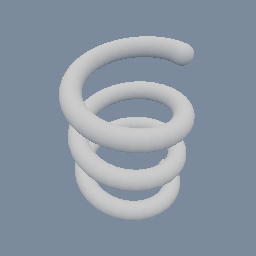
A line bent into a helix, read as a curve in space and given a thickness: one exact field, with nothing swept and nothing stitched.
geo/SDFCreate geo/SDFOffset geo/PointBuilder
Documentation / Node reference / geo nodes
Creates an SDF field from real geometry.
Sdf Primitives
Turns geometry into a signed distance field, so shapes that were not authored as SDF primitives can join an SDF tree. A 2D manifold gives a 2D SDF whose value is the exact signed distance to its outline. Segments give one too. A volume carrying distances gives a 3D SDF that samples it.
This is how a 2D SDF tree gets a CORRECT INTERIOR. A field built from geo/SDFBoolean is exact outside the shape but only a lower bound inside it, which shows up as distance bands following the union's hidden seams instead of its outline. Send the tree through geo/SDFTriangulate, which outputs a manifold by default, and back in here: the result is exact on both sides. Use dual contouring on the way if the shape has corners.
Several loops work: a square with a square hole reads negative in the ring and positive in the hole, whichever way each loop was wound.
**One field per input object, in its own frame.** Each input object gives its own SDF object, read in the object's own space, and that SDF object takes the input's position, rotation and scale and keeps its place in the hierarchy. So an outline aimed out of the XY plane by a geo/Transform in OBJECT mode keeps its aim, and moving a mesh at the object level does not bake it again. To read several objects as ONE field, put a geo/Merge or a geo/SDFBoolean after this node. A downstream bend, twist or repeat then works about the object's own axes, not the world's.
**Segments go in too, and an OPEN curve comes out UNSIGNED.** A chain of segments that comes back to its first point is a ring, and it reads exactly as a manifold outline does: negative inside. A chain that does not close is an open curve, and its field is the plain DISTANCE to the curve, positive on both sides and zero on the curve itself. There is no switch between the two readings, because a signed reading of an open chain is not a real thing: its sign would flip across an arbitrary half-plane rather than at a boundary.
That unsigned field is the point. Send it through geo/SDFOffset and the radius becomes the curve's WIDTH: the result is the offset curve exactly, with round joins and round caps, and no polygon was built on the way. geo/Line into geo/SDFCreate into geo/SDFOffset is the whole recipe. To get there from a shape rather than from a line, put a geo/CurveProperties on OPEN between geo/M2DTriangulate and here: it takes the closing segment off each ring, and what arrives is the outline as a bare curve. If you wanted the open chain FILLED instead, close it with geo/M2DCreate first, which is the node that turns loops into an area.
One object can hold both: its closed runs are gathered into one field, its open runs into another, and the two are unioned. That works out because the unsigned half is never negative, so the union keeps the ring's interior where there is one.
**A curve in 3D makes a TUBE.** Set curve dimension to 3D and a segment input keeps its z instead of being flattened: the field becomes the distance to the curve in space, and geo/SDFOffset turns that radius into a round tube running along it. geo/Line into geo/PointBuilder into geo/SDFCreate into geo/SDFOffset is a helix, a spring or a length of cable, as one exact field with nothing swept and nothing stitched. Closed or open changes nothing here, since a curve in 3D encloses no volume either way: a closed curve simply closes the tube into a loop. A FLAT curve read as 3D still makes a tube, which is exactly why this is a choice you make rather than something the node guesses from the points, and why moving one point out of the plane never silently changes what comes out. The limit is 2048 segments for a 3D curve, half the flat one's, because a segment in space takes twice the room. The tube is ROUND, and only round: sweeping some other cross-section along the curve needs a frame at every segment and is a different feature, not a setting here.
Several closed outlines read EVEN-ODD here: a point inside two of them is outside the field, so two rings that OVERLAP make their overlap a HOLE. That is what makes a glyph's counter a hole with no winding to keep track of, and it is the only reading a bare chain of segments can have, since a segment carries no orientation you can trust. When the UNION is what you wanted, route through geo/M2DCreate first: that is the node that owns the fill rules, and what comes out of it arrives here as a manifold outline.
The cost is one segment test per sample, so a few hundred segments is comfortable and a few thousand is slow. The limit is 4096 segments per input object, closed and open together, and it is a refusal rather than a silent truncation: the scan is a plain loop with nothing accelerating it, so a field of many thousands of segments would scan all of them at every pixel. A shape past the limit wants geo/M2DSimplify, or fewer samples at its source. Two smaller notes: the bounds are the outline's own extents, so the visualization quad hugs the shape more tightly than a smooth boolean's inflated bounds did, and changing the NUMBER of segments regenerates the preview shader while moving the points does not.
**Importing a 3D model.** Plug the mesh straight in: a triangle mesh or a 3D manifold is voxelized here, and the result is a 3D SDF you can boolean, transform, repeat, slice and mesh like any other. The params below are what that bake uses. Voxel size is the resolution of the field, so it is the one that matters: a grid cannot hold an edge sharper than one voxel. The limit is 16.7 million voxels, 256 cubed, and memory is real at that size.
A closed surface is what a voxelizer needs, since it decides inside from outside by flooding the space around the mesh. A shape with holes in it will read as solid where you did not mean it to. Split vertices are fine, so geo/Box goes in as it is.
**Voxelizing a big model takes time, and the cache means it only happens once.** Set cache to read and write, and the bake is saved as a .pvol beside the scene's assets; every cook after that loads the voxels instead of voxelizing again. The file is tied to the mesh it came from and to the settings above, so moving a vertex or changing the voxel size makes it stale and it is baked again. Moving the whole object does not, since the bake is in the object's own frame. Read only only reads: it loads the file without computing the input at all, and errors if there is no file, which is what a scene you ship wants, since it can then never spend a minute voxelizing, or building the mesh it would voxelize, on someone else's machine. It does not check that the file still matches the mesh, and it places the field where the input object was when the file was last written, without its parent. A distance .pvol saved by geo/VolumeExporter reads too. Generate computes the input, bakes and overwrites the file on demand, and under read only it is the only thing that does. On the web nothing is ever written; a cache file there is one you shipped as an asset alongside the scene.
A VOLUME input works too and skips the bake, since it arrives already baked: that is the route to take when the volume itself is wanted in the scene, or when the volume came from a file rather than from a mesh. The params below are ignored for it, and geo/VolumeCreate's own decide the grid instead. To only SEE a distance volume as a surface, this node is not needed: the volume draws as one by itself, at grids well past this node's limit. Come here for what only an SDF does: booleans, deforms, repeats and the rest of the SDF nodes.
Two range notes: the field reaches only as far past the mesh as the padding, and beyond the grid box it reports the distance to the box instead, which keeps growing so a march from outside still behaves. Raise padding when a march starts far away.
**To bake only part of a model, turn on `region`.** Only what is inside its box is voxelized, so the same voxel budget buys a much finer grid: a head off a full bust, a hand off an arm. That is also the cheap way to find the voxel size a detail needs before paying for it on the whole model. The piece comes out closed where the box cuts through the mesh, as if the mesh had been capped there, so it is a solid you can boolean like any other. The box comes with a manipulator in the viewport, and `set region from input` resets it to the whole mesh. It is in world space, so moving the object moves the mesh through it, and that rebakes. To cut along a slanted plane, rotate the model first and rotate the field back after.
**A field made here wears ONE colour.** The per-region shading record (a geo/MaterialAttributes on OBJECT mode, see geo/SDFBoolean) applies to the whole imported model: per-vertex colours from the source mesh would need a second volume of colour voxels beside the distance volume, which is a different feature. Boolean several fields together to get several colours.
Each mesh and each volume becomes its OWN field object, like every other input object; use geo/SDFBoolean to combine them.
| Name | Type | What it does |
|---|---|---|
| curveDimension | UInt8 _2D · _3D | How a SEGMENT input is read. 2D flattens it into its own XY plane (the object's transform still places it) and gives a 2D field, which is what an outline or a flat drawing wants. 3D keeps the curve where it is and gives a 3D field whose value is the distance to it, so geo/SDFOffset turns it into a round tube along the curve. A flat curve read as 3D still makes a tube, which is why this is a choice and not something the node guesses from the points. |
| voxelSize | Float | Size of one voxel when a MESH input is baked, in the mesh's own units (a scaled object scales its voxels too). This is the resolution of the field: no edge can be sharper than one voxel. Ignored for a 2D manifold or a volume input. |
| maxResolution | Vector3UInt | Ceiling on the voxel count per axis, so a small voxel size on a large shape cannot run away with memory. Hitting it raises the voxel size under `fit whole shape`; with that off, it keeps the voxel size and cuts the grid short, so the far side of the shape is left out, and the node warns with the resolution the whole shape needs. |
| fitWholeShape | Bool | Raise the voxel size, never lower it, until the whole shape fits in `max resolution` and in the most voxels this node can hold. On, a large mesh still bakes whole, at a coarser voxel, and the voxel size you set is the finest detail allowed. Off, the voxel size is kept and a shape too large for the grid is cut short. The size used is shown in the node info panel. |
| padding | UInt32 | Margin around the mesh, in voxels. The field only reaches this far past the shape; beyond the grid box it reports the distance to the box instead. Raise it when a march starts far away. |
| region | Bool | Bake only what is inside a box, so a fine voxel size costs a fraction of what it costs on the whole mesh. The piece comes out closed, with flat caps where the box cuts through the mesh. Drag the box in the viewport, or type its corners. MESH input only. |
| regionMin | Vector3 | Lower corner of the box, in world space. |
| regionMax | Vector3 | Upper corner of the box, in world space. |
| setRegionFromInput | Button | Set the box to the bounds of the mesh on the input, so you can shrink it from there. |
| allocator | UInt8 TEMP · POOL · FLAT_POOL | Where the bake's scratch voxels come from. The voxels are copied into the field, so this memory is released as soon as the node is done with it. |
| cache | UInt8 OFF · READ_WRITE · READ_ONLY | Keep the bake in a .pvol file beside the scene's assets, so opening the scene loads the voxels instead of voxelizing the mesh again. Read and write bakes the file the first time and reuses it after. The file is tied to this mesh and these settings, so with read and write, moving a vertex or changing the voxel size makes it stale and it is baked again. Read only only reads: it loads the file without computing the input at all, and errors if there is no file, which is what a shipped scene wants. It does not check that the file still matches the mesh. The field is placed where the input object was when the file was last written, but without its parent, since the file does not hold the hierarchy. A distance .pvol saved by geo/VolumeExporter reads too. Press generate to bring the file up to date. On the web nothing is ever written: a cache file there is one you shipped as an asset. |
| cachePath | AssetPath | Where that file lives, under the assets root. Empty means this node's own path, so nothing has to be typed. Several meshes on the input get one file each, numbered after the first. Type a path here before exporting a scene for the web: the export collects the asset files its params NAME, and an empty path names nothing. |
| cachePrecision | UInt8 FLOAT32 · FLOAT16 | How the cached voxels are stored. 32 bit is the bake exactly. 16 bit halves the file and costs about a thousandth of each distance, which is nothing at unit scale and half a unit on a model five hundred units across. |
| generate | Button | Compute the input, bake it now and write the cache file, even if the one on disk still matches. Under read only this is the ONLY thing that computes the input: it is how the file gets made in the first place, and how it is brought up to date after the mesh or the settings changed. |
Scenes you can open in the editor that teach this node.
A line bent into a helix, read as a curve in space and given a thickness: one exact field, with nothing swept and nothing stitched.
geo/SDFCreate geo/SDFOffset geo/PointBuilder
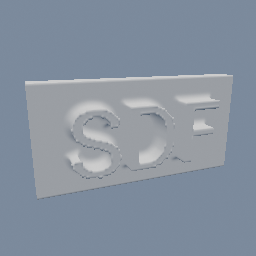
A word extruded into a solid and voxelized into an SDF field, with the bake cached to a .pvol so it only ever happens once. Edit the text to watch the cache go stale and re-bake itself.
geo/SDFCreate
This page is generated from the engine, so it describes the release you can download. The same text is in the editor's Help panel next to the node itself.