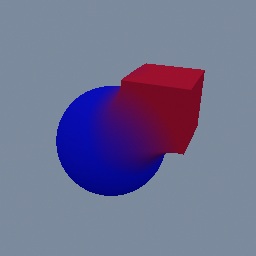
This shows how to apply different colors on an SDF object
geo/MaterialAttributes geo/SDFBoolean geo/SDFBox geo/SDFSphere
Documentation / Node reference / geo nodes
Sets the shading attributes: colour, roughness, metallic, emission and transmission.
Attributes
Writes the four attributes materials and exporters read for shading, under named channels rather than one geo/AttributeCreate per channel. Each channel has its own toggle, and a channel left off is not written at all, so this node can set a colour without also stamping a roughness over what an upstream node put there.
`mode` picks the tier. OBJECT, the default, gives the whole object one set of values: that is what an SDF field reads as its per-region shading record (see geo/SDFBoolean), and what the 3MF and glTF exporters read for a part's colour. POINT writes them per point, which is the tier geo/SDFTriangulate outputs and the tier a code/Attribute reads inside a mat/Builder graph. There is no PRIMITIVE mode: put a geo/AttributePromote after a POINT write when you need one.
`group` restricts the writes to an OBJECT group, so several regions of one merged stage can be coloured differently without a geo/Delete in between.
The attribute names are `COLOR`, `ROUGHNESS`, `METALLIC` and `EMISSION`, which is what geo/AttributeCreate writes when set by hand: the two are interchangeable, and geo/AttributeCreate stays the way to write anything else. Emission is a COLOUR and is added on top of the lighting, unlit, the same as mat/MeshPBR's `emissive`.
Not every channel reaches every renderer. On an SDF object all four land, per region of the field. On a raster mesh, per-point `COLOR` shows under the default material with no material node at all, and the basic, point and polyline materials read it through their `useVertexColor`. It is MULTIPLIED into the material's own colour, the way glTF composes a COLOR_0 attribute, so a material left at its default colour shows the attribute close to as authored. Roughness, metallic and emission reach a shader through a mat/Builder graph or through an exporter. An input that reads none of them is left as it is.
**On voxels** both modes do the same thing: colour, roughness, metallic and emission become the material of every voxel of the object, whatever colours it had. That is how geo/VoxelBox, geo/VoxelSphere and geo/VoxelCreate get their colour. Transmission does not apply to voxels.
**Transmission.** `TRANSMISSION`, `IOR`, `ATTENUATION_COLOR` and `ATTENUATION_DISTANCE` make a region see-through, the glTF way: transmission is how much light goes through, IOR how much it bends, and the two attenuation channels how the medium tints it along the path, white light turning the attenuation colour after the attenuation distance (0 is infinite, which absorbs nothing). For now only an SDF object reads them, per region of the field, and what shows through is the scene environment. The first region to let light through regenerates the preview shader once (see geo/SDFBoolean). Transmission takes the DIFFUSE away and keeps the reflection, so glass still shows the highlights of the scene lights.
A record that authors transmission but not roughness gets the record's default roughness, 0.5, not mat/MeshSDF's: that reads as frosted glass rather than clear. Turn `troughness` on and set it near 0 for clear glass.
| Name | Type | What it does |
|---|---|---|
| group | String | Restrict the writes to the named OBJECT group(s). Empty writes on every object. |
| mode | UInt8 OBJECT · POINT | Which tier the attributes are written on. OBJECT gives the whole object one set of values, which is what an SDF field's shading record and the model exporters read. POINT writes them per point. |
| tcolor | Bool | Write the COLOR attribute. |
| color | Color | The surface colour. It overrides the material's own colour wherever an object attribute is read: on an SDF object it colours that region of the field, and on export it is the part's colour. |
| troughness | Bool | Write the ROUGHNESS attribute. |
| roughness | Float | How rough the surface is: 0 is a mirror, 1 spreads a reflection over the whole surface. It also picks how blurred the scene environment's reflection is. |
| tmetallic | Bool | Write the METALLIC attribute. |
| metallic | Float | How metallic the surface is. A metal takes its colour from what it reflects, so a metallic surface mostly shows the scene environment. |
| temission | Bool | Write the EMISSION attribute. |
| emission | Color | A colour the surface gives off by itself, added after the lighting. It brightens this surface only and casts no light on anything else. Black, the default, adds nothing. |
| ttransmission | Bool | Write the TRANSMISSION attribute. |
| transmission | Float | How much of the light the surface does not reflect goes through it: 0 is opaque, 1 is clear glass. On an SDF object, the first region above 0 regenerates the preview shader once. Without `roughness` also authored the region shades at roughness 0.5, which reads as frosted rather than clear. |
| tior | Bool | Write the IOR attribute. |
| ior | Float | Index of refraction of the medium: how much light bends through it, and how strongly it reflects head on. 1.5 is glass and most resins, 1.33 water. It is relative to the air around the object, so below 1 means a medium LESS dense than its surroundings, and the ray spreads out through it instead of converging: that is how to fake an air bubble in water (0.75) or in resin (about 0.67), since a medium inside another is not modelled. Below 1, a ray meeting the surface at a grazing angle cannot get in and is all reflected, so the rim shows only the reflection. Lowest value 0.25. |
| tattenuationColor | Bool | Write the ATTENUATION_COLOR attribute. |
| attenuationColor | Color | The colour white light turns after travelling the attenuation distance through the medium. A thicker part of the object reads a deeper tint. White absorbs nothing. |
| tattenuationDistance | Bool | Write the ATTENUATION_DISTANCE attribute. |
| attenuationDistance | Float | How far light travels through the medium, in world units, before it has turned the attenuation colour. Smaller is a denser tint. 0 is infinite: nothing is absorbed. |
Scenes you can open in the editor that teach this node.
This shows how to apply different colors on an SDF object
geo/MaterialAttributes geo/SDFBoolean geo/SDFBox geo/SDFSphere
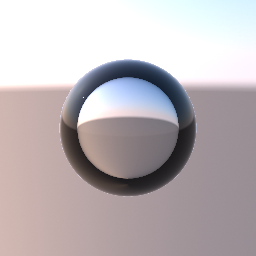
A clear sphere with an IOR of 0.75: air (1.0) relative to the water around it (1.33). An IOR below 1 bends the light the other way, so where a glass ball flips the sky, the bubble spreads it. Near the rim the view cannot get in at all. A real bubble reflects everything there, like a mirror. The preview keeps only the thin surface reflection, so the rim reads as a dark ring. The bubble floats on its own in front of the sky. A bubble inside a clear object is not supported yet: it needs nested media.
geo/MaterialAttributes
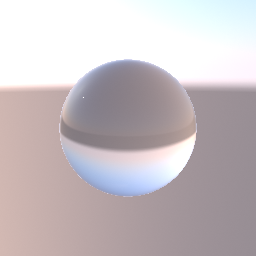
A clear glass sphere lit by one point light, in front of an analytic sky held by geo/Environment. The glass shows the sky bent through it, upside down like a ball lens. Bypass the environment node and the sphere turns black with only the light's highlight: glass shows the environment, not the camera's background colour or other objects behind it.
geo/Environment geo/MaterialAttributes
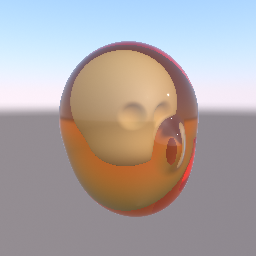
A head printed in clear amber resin, with an opaque skull inside it. The skin and the skull are two regions of one SDF object, joined by a hard union. geo/MaterialAttributes makes the skin transmissive, with an IOR and an amber attenuation colour, and gives the skull a bone colour. The view ray bends into the resin, turns deeper amber the further it travels, and stops on the skull. The light that reaches the skull is not dimmed by the resin around it, and the resin shows the environment, not other objects behind it.
geo/MaterialAttributes geo/SDFBoolean geo/Environment
This page is generated from the engine, so it describes the release you can download. The same text is in the editor's Help panel next to the node itself.