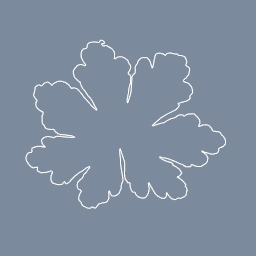
A leaf photo's alpha traced into a closed outline. Change the resolution for a closer or a simpler curve.
geo/TextureTrace
Documentation / Node reference / geo nodes
Traces the outlines of a picture into closed curves.
Line
Draws the outline of every shape in a 2D texture as closed curves, for a logo in relief, a cut-out or a stamp. Send the curves into geo/SDFCreate and geo/SDFExtrude for the shape in relief.
Point `texturePath` at the TEX node showing the picture: a tex/Image, a tex/Text, a tex/Builder. A 3D texture is refused: geo/VolumeFromTexture is the node for those.
**Pick what to trace.** `channel` says which number of each texel is read: red, green, blue, alpha, or the luminance (how bright the texel looks). `level` is where the outline passes, and `inside` says which side of it is the shape. A dark logo on white is luminance, BELOW. A white one on black is ABOVE. A tex/Text over a transparent background is alpha, ABOVE. Colours are read as linear values, the way the renderer reads them, so a mid grey of 128 in the file is about 0.2 here.
**Every curve closes**, even where a shape runs into the edge of the picture: the outline then follows the edge. An outer outline runs counter-clockwise and the outline of a hole clockwise.
**Up in the picture is up in the scene.** The curves lie in the XY plane, with the picture's top towards +Y. `size` is the length of the picture's longest side in world units, and `center` is where its middle sits.
**Method.** Dual contouring keeps the corners of a hard-edged picture, a QR code or pixel art, square. Marching squares cuts each of those corners at 45 degrees, but follows a soft, blurred picture a little more smoothly. Both follow a smooth anti-aliased logo closely.
**Resolution** is how many samples the trace takes along the picture's longest side, 256 by default. A larger picture is averaged down to it first, which keeps the trace quick and the outlines smooth; a smaller one is traced at its own size, since samples between its texels would add nothing. Raise it for fine detail, lower it for a simpler outline. Pixel art keeps its corners exactly square only when traced at its own size.
**Tolerance** removes points that lie within that distance of a straight line through their neighbours, measured in samples so it does not change with `size`. It keeps a traced picture small: on a QR code it leaves only the corners. At 0 every point is kept.
A picture where nothing crosses the level is an error naming the range of values the channel holds, so you can set the level inside it.
**A texture made on the GPU is read back to the CPU.** In a browser the copy lands a tick or more later, and the nodes below this one wait for it. Changing only this node's params reuses the copy already made.
| Name | Type | What it does |
|---|---|---|
| texturePath | NodePath | The TEX node showing the picture to trace: a tex/Image, a tex/Text or a tex/Builder. |
| channel | UInt8 R · G · B · A · LUMINANCE | Which number of each texel is traced: red, green, blue, alpha, or the luminance, how bright the texel looks. |
| level | Float | Where the outline passes. Channels run from 0 to 1, so 0.5 is halfway between black and white. |
| inside | UInt8 ABOVE · BELOW | Which side of the level is the shape. BELOW for a dark shape on a light ground, ABOVE for a light shape on a dark ground. |
| method | UInt8 MARCHING_SQUARES · DUAL_CONTOURING | Dual contouring keeps the corners of a hard-edged picture square. Marching squares cuts them at 45 degrees and follows a soft picture a little more smoothly. |
| resolution | UInt32 | How many samples the trace takes along the picture's longest side. A larger picture is averaged down to it first; a smaller one is traced at its own size. |
| tolerance | Float | How far, in samples, a point may lie from a straight line through its neighbours and still be removed. 0 keeps every point. |
| center | Vector2 | Where the middle of the picture sits, in world units. |
| size | Float | The length of the picture's longest side, in world units. The other side keeps the picture's proportions. |
Scenes you can open in the editor that teach this node.
A leaf photo's alpha traced into a closed outline. Change the resolution for a closer or a simpler curve.
geo/TextureTrace
This page is generated from the engine, so it describes the release you can download. The same text is in the editor's Help panel next to the node itself.