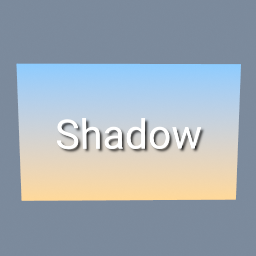
A title with a soft shadow, over a gradient. The shadow is the same title blurred, turned black and layered under it a little lower and to the right.
tex/Blur tex/Layer tex/Text tex/Brightness tex/Ramp
Documentation / Node reference / tex nodes
Blurs the image on its input, in all of it or where a mask says.
Color
Softens the image with a Gaussian blur: each pixel becomes a weighted average of the pixels around it, the nearest counting most. radius is how far the blur reaches, in pixels by default. The blur fades out smoothly and stops at the radius, so a radius of 10 spreads each pixel over 10 pixels on every side and no further. 0 leaves the image as it is.
borderMode says what lies beyond the edge of the image. CLAMP repeats the edge pixels, so the picture keeps its colour right up to its edge. TRANSPARENT treats the outside as empty, so the edges fade out too: use it to blur a shape or text into a shadow or a glow. REPEAT reads the opposite side of the image past each edge, so a tiling texture stays tileable once blurred. MIRROR reads the image flipped past each edge.
Transparent parts are handled the way you expect: a white shape on a transparent background blurs into a soft white edge, never a dark one, whatever colour the transparent pixels hold.
A drop shadow is tex/Blur with TRANSPARENT on a copy of the text or shape, darkened with tex/Brightness, then a tex/Layer that puts the sharp version over it, shifted a little.
The radius stops at 128 pixels: a larger blur takes too long this way, so a larger radius is reduced to 128 and the node shows a warning. To blur more, shrink the image with tex/Resize, blur it, and resize it back.
Connect an image to the second input, the mask, to blur only part of the picture: where the mask is white the blur is full, where it is black the image stays sharp. The result keeps the input's size. It runs on the GPU when there is one, and any tex node can feed it.
| Name | Type | What it does |
|---|---|---|
| radius | Float | How far the blur reaches. Each pixel is spread over this distance on every side and no further, fading out smoothly towards it. 0 leaves the image as it is. Measured as radiusUnit says. Above 128 pixels the blur stops growing, and the node warns. |
| radiusUnit | UInt8 PIXELS · FRACTION_OF_SHORTER_SIDE | How radius is measured. PIXELS: in pixels of the input. FRACTION_OF_SHORTER_SIDE: as a part of the image's shorter side, so 0.05 on a 1000 by 500 image is 25 pixels, and the blur looks the same when the image changes size. |
| borderMode | UInt8 CLAMP · TRANSPARENT · REPEAT · MIRROR | What the blur sees past the edge of the image. CLAMP: the edge pixels repeat, so the edges stay as they are. TRANSPARENT: nothing is there, so the edges fade to transparent too. Use TRANSPARENT for a shadow or a glow. REPEAT: the opposite side of the image, so a texture that tiles still tiles after the blur. MIRROR: the image flipped at its edge. |
| channels | UInt8 COLOR · ALPHA · ALL · RED · GREEN · BLUE | Which channels the change is written to. COLOR changes red, green and blue and keeps the alpha. ALPHA changes only the alpha and keeps the colour, so you can fade a picture without touching its colours. ALL changes all four, and RED, GREEN or BLUE only that one. The other channels stay as they are on the input. |
| amount | Float | How much of the change to apply, from 0 (the input, untouched) to 1 (the full change). Values in between blend the input and the changed picture. With a mask, this scales the mask. |
| maskChannel | UInt8 LUMINANCE · ALPHA · RED · GREEN · BLUE | Which value of the mask image says how strongly each pixel changes: its brightness (LUMINANCE), its alpha, or its red, green or blue. White, or 1, is the full change, black, or 0, none. LUMINANCE counts transparent parts of the mask as black, so a white shape or text on a transparent background masks by its shape. Only used when an image is connected to the mask input. |
| invertMask | Bool | Swaps the mask: the change then happens where the mask is black and not where it is white. Only used when an image is connected to the mask input. |
Scenes you can open in the editor that teach this node.
A title with a soft shadow, over a gradient. The shadow is the same title blurred, turned black and layered under it a little lower and to the right.
tex/Blur tex/Layer tex/Text tex/Brightness tex/Ramp
This page is generated from the engine, so it describes the release you can download. The same text is in the editor's Help panel next to the node itself.