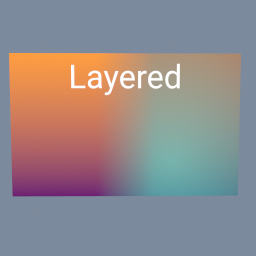
A title with a soft shadow, over a gradient. The shadow is the same title blurred, turned black and layered under it a little lower and to the right.
tex/Blur tex/Layer tex/Text tex/Brightness tex/Ramp
Documentation / Node reference / tex nodes
Lays one image over another: side by side with a soft seam, a picture inside a shape, a logo in a corner.
Color
Connect the image underneath to the first input (background) and the one on top to the second (foreground). For more layers, chain tex/Layer nodes: each result becomes the next one's background.
position, anchor, scale and rotation place the foreground. anchor is the point of the foreground that goes to position, both from 0 to 1 from the top left corner: the default puts the foreground's centre at the centre, and position 1, 1 with anchor 1, 1 puts it in the bottom right corner. scale 1 shows the foreground at its own size in pixels, and rotation turns it around the anchor, counter-clockwise. Around the foreground there is nothing, so the background shows.
blendMode says how the two mix. NORMAL lays the foreground on top, with its transparent parts showing the background. ADD, SUBTRACT, MULTIPLY, SCREEN, OVERLAY, SOFT_LIGHT, DARKEN, LIGHTEN and DIFFERENCE combine the colours the way image editors do. INSIDE, OUTSIDE, ATOP and XOR use the background's alpha to cut the foreground, so they need a background with transparent parts: put a tex/Shape on the background and a picture on the foreground, and INSIDE gives the picture cut to the shape. Every mode shows the foreground unchanged where the background is transparent, and the background where the foreground is.
opacity fades the foreground. A mask on the third input says where it shows: white shows it fully, black not at all. A tex/Ramp there gives a soft seam between two pictures, and a tex/Shape or tex/Text a cut-out. The mask can be any size; it is stretched over the result.
The result has the background's size by default (sizeFrom). With nothing on the background input, the background is transparent and the size of the foreground, so one tex/Layer also places or pads a single image. It runs on the GPU when there is one, and in floating point.
| Name | Type | What it does |
|---|---|---|
| blendMode | UInt8 NORMAL · ADD · SUBTRACT · MULTIPLY · SCREEN · OVERLAY · SOFT_LIGHT · DARKEN · LIGHTEN · DIFFERENCE · INSIDE · OUTSIDE · ATOP · XOR | How the foreground mixes with the background. NORMAL lays it on top. ADD and SUBTRACT add or remove its light, MULTIPLY darkens, SCREEN lightens, OVERLAY and SOFT_LIGHT raise the contrast, DARKEN and LIGHTEN keep the darker or lighter of the two, DIFFERENCE shows how they differ. INSIDE keeps the foreground only where the background is opaque, OUTSIDE only where it is transparent, ATOP lays it on the background's opaque parts only, and XOR keeps each where the other is not. These four need a background with transparent parts, such as a tex/Shape. |
| opacity | Float | How much the foreground shows, from 0 (not at all, the background as it is) to 1. |
| position | Vector2 | Where the foreground goes: 0 to 1 across the result, from its top left corner. The foreground's anchor is put here. |
| anchor | Vector2 | Which point of the foreground is put at position: 0 to 1 across the foreground, from its top left corner. 0.5, 0.5 is its centre, 0, 0 its top left corner. |
| scale | Float | The size of the foreground. 1 shows it at its own size in pixels, 0.5 at half that. |
| rotation | Float | Turns the foreground around its anchor, in degrees, counter-clockwise. |
| sizeFrom | UInt8 BACKGROUND · FOREGROUND · CUSTOM | The size of the result: the background's (BACKGROUND), the foreground's (FOREGROUND), or the size you set (CUSTOM). The background is stretched to fill it, and the foreground keeps its own size in pixels. |
| size | Vector2UInt | The width and height of the result in pixels, when sizeFrom is CUSTOM. |
| amount | Float | Scales the mask, from 0 (the background as it is) to 1. Only used when an image is connected to the mask input. |
| maskChannel | UInt8 LUMINANCE · ALPHA · RED · GREEN · BLUE | Which value of the mask image says where the foreground shows: its brightness (LUMINANCE), its alpha, or its red, green or blue. White, or 1, shows it fully, black, or 0, not at all. LUMINANCE counts transparent parts of the mask as black, so a white shape or text on a transparent background works as it is. Only used when an image is connected to the mask input. |
| invertMask | Bool | Swaps the mask: the foreground then shows where the mask is black and not where it is white. Only used when an image is connected to the mask input. |
Scenes you can open in the editor that teach this node.
A title with a soft shadow, over a gradient. The shadow is the same title blurred, turned black and layered under it a little lower and to the right.
tex/Blur tex/Layer tex/Text tex/Brightness tex/Ramp
Two pictures side by side, blended across a soft seam by a gradient mask, the right one made see-through, and a title written on top. Each layer is a tex/Layer: its third input is the mask that says where the picture on top shows.
tex/Layer tex/Ramp tex/Text tex/Brightness tex/ImageExporter
One tile, a gold star on a blue gradient, repeated four times each way and turned a little, on a plane. tex/Transform with borderMode REPEAT does the tiling.
tex/Transform tex/Shape tex/Ramp tex/Layer
This page is generated from the engine, so it describes the release you can download. The same text is in the editor's Help panel next to the node itself.