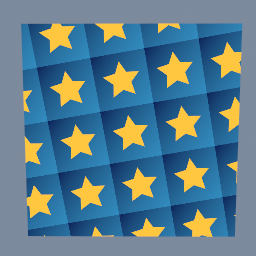
One tile, a gold star on a blue gradient, repeated four times each way and turned a little, on a plane. tex/Transform with borderMode REPEAT does the tiling.
tex/Transform tex/Shape tex/Ramp tex/Layer
Documentation / Node reference / tex nodes
Draws one filled shape on a transparent texture: a rectangle, an ellipse, a polygon or a star.
Primitives
Makes the shape you need to cut a picture to, or to use as a mask: a rounded rectangle to frame a photo, a circle for a vignette, a star for a badge.
center goes from 0 to 1 across the image, measured from its top left corner. size is measured against the image's shorter side, so a size of 1 fills the shorter side and a shape keeps its proportions when the image is not square: a circle stays a circle on a wide image. rotation turns the shape counter-clockwise, in degrees.
The edges are smoothed over about one pixel at any resolution, and feather widens that soft edge by as many pixels as you set.
The shape is the fill colour, and its alpha says where the shape is: the colour is the fill's all over, and the alpha goes from the fill's alpha inside to 0 outside. So it works as the mask of a filter as it is: the default maskChannel LUMINANCE counts transparent parts as black. A coloured or dim fill masks by its brightness too; set maskChannel to ALPHA to use the shape alone. The texture is made in floating point.
| Name | Type | What it does |
|---|---|---|
| type | UInt8 RECTANGLE · ELLIPSE · POLYGON · STAR | The shape to draw. RECTANGLE can have rounded corners, ELLIPSE fits inside size, POLYGON is a regular polygon with as many sides as you set, STAR has as many points as you set. POLYGON and STAR point straight up, and fit inside size too. |
| cornerRadius | Float | How round the rectangle's corners are, from 0 (square corners) to 1 (as round as the shorter side allows, which makes a pill shape or a circle). |
| sides | SInt32 | How many sides the polygon has: 3 is a triangle, 6 a hexagon. |
| points | SInt32 | How many points the star has. |
| innerRadius | Float | How deep the star's notches are: the distance of the notches from the centre, as a fraction of the distance of the points. Lower values make thinner points. |
| center | Vector2 | Where the centre of the shape is: 0 to 1 across the image, from its top left corner. |
| size | Vector2 | The width and height of the shape, measured against the image's shorter side: 1 is as wide as the shorter side. The shape keeps its proportions whatever the image's. |
| rotation | Float | Turns the shape around its centre, in degrees, counter-clockwise. |
| feather | Float | Softens the edge by this many pixels. 0 keeps a clean edge, smoothed over one pixel. |
| fillColor | Color4 | The colour of the shape. Its alpha makes the whole shape see-through. Around the shape the texture is transparent. |
| resolution | Vector2UInt | Texture width and height in pixels. |
Scenes you can open in the editor that teach this node.
One tile, a gold star on a blue gradient, repeated four times each way and turned a little, on a plane. tex/Transform with borderMode REPEAT does the tiling.
tex/Transform tex/Shape tex/Ramp tex/Layer
This page is generated from the engine, so it describes the release you can download. The same text is in the editor's Help panel next to the node itself.