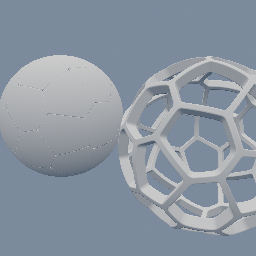
Hollows out an SDF object into a shell.
Replaces each input SDF object's solid with a shell along its surface. `side` picks where the wall grows: BOTH straddles the surface, `thickness` on each side; OUTSIDE grows it outward by `thickness`, so the object's inside stays the hole; INSIDE grows it inward by `thickness`, so the outer silhouette does not change, which is what a casing or a cup wants. Where the object is thinner than `thickness`, an INSIDE wall fills it solid. The shell is CLOSED: to see inside it, cut it open with a geo/SDFBoolean subtraction, which is the usual way to get a cup or a bowl. Repeating the node nests shells inside one another. It works on 2D and 3D fields alike. Non-SDF objects pass through unchanged.
Scenes you can open in the editor that teach this node.
This page is generated from the engine, so it describes the release you can download. The same text
is in the editor's Help panel next to the node itself.